02 / Code
Software & Creative Tools
I design and build the software that creative teams rely on, from agentic AI inside Adobe After Effects to data-driven automation pipelines deployed across Just Eat Takeaway's global creative organisation. Each tool below started as a real bottleneck and shipped as production software.
Creative software & agentic AI for Adobe and Just Eat Takeaway
01 / 05
Snowball 3.0
The Problem
Versioning campaigns by hand meant designers manually editing values across hundreds of compositions: slow, error-prone, and creatively deadening.
What I Built
A custom After Effects plugin that rigs compositions and binds their values to a Google Sheet. Stakeholders edit the sheet; the plugin pushes changes into hundreds of comps in a single click, separating the repetitive work from the creative work.
How It Works
- Google Sheet Stakeholder input
- Snowball plugin
- Bulk value injection across rigged compositions in After Effects
- One-click render-ready output
Under The Hood
#include "lib/json2.jsxinc"
#include "snowball/rig.jsxinc"

// ExtendScript host (ES3). Rows arrive
// from the CEP panel via the Sheets API.
function applyCampaign(json) {
  var rows = JSON.parse(json);
  var proj = app.project, n = 0;
  app.beginUndoGroup("Snowball");
  for (var i = 1; i <= proj.numItems; i++) {
    var comp = proj.item(i);
    var row = rows[comp.name];
    if (!(comp instanceof CompItem)) continue;
    if (!row) continue;
    Snowball.rig(comp, row);
    n++;
  }
  app.endUndoGroup();
  return n + " comps updated";
}
Key Features
-
01
Figma Bridge
Paste a link to a Figma project and Snowball imports its layers as native After Effects layers. Text, shapes and images arrive ready to animate, with nothing rebuilt by hand.
-
02
Motion Studio
A procedural animation studio built into Snowball. Designers animate layers without setting a single keyframe, so there's nothing to place, nudge or clean up by hand.
-
03
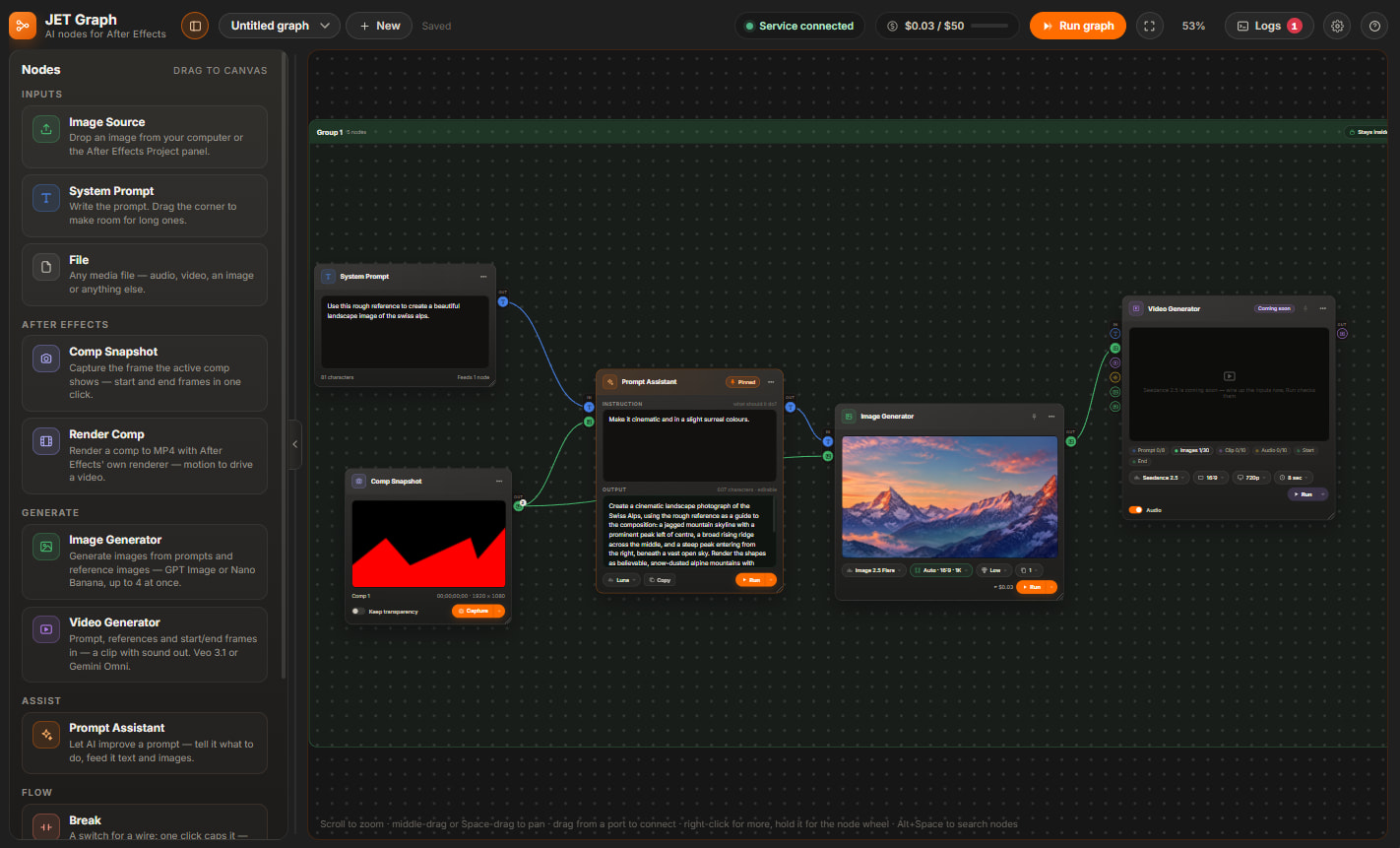
JET Graph
An AI node canvas for generating images and video. Nodes snapshot or render the designer's own After Effects comps and feed them in as references, so the AI builds on their work and they stay in creative control.
02 / 05
JET AE AI
The Problem
After Effects has a steep, time-consuming learning curve. To help more people work in it, I built an AI agent that lives inside After Effects, letting the team automate repetitive tasks through a simple chat and an Automation panel that generates custom scripts on demand.
What I Built
One of the first tools to bring agentic AI directly into After Effects. It understands the issue at hand, writes expressions from scratch, debugs a selected expression, answers questions instantly, and executes whole tasks on command, for example changing a single word across every composition in one instruction. It's not just an API call, but an entire MCP server that I set up to enable any Agent to be able to use tools to accurately work inside of After Effects autonomously.
Project Harness
I connected the agent to Monday.com through a project harness. Tickets and updates stream into After Effects in real time, so designers see every important change without leaving the timeline. Because the agent can read the project too, it can investigate last-minute changes and action them for the user, saving the time usually spent chasing and applying late feedback.
How It Works
- Prompt or a Monday.com update
- Agent API Harness (MCP)
- Expression generation & task planning
- Executed directly inside After Effects
Gumroad Plugin
A free plugin version of this tool is available for download on Gumroad, bringing AI-assisted scripting and expression controls directly into After Effects.
Get Free Plugin on Gumroad03 / 05
Breadn Butter
The Problem
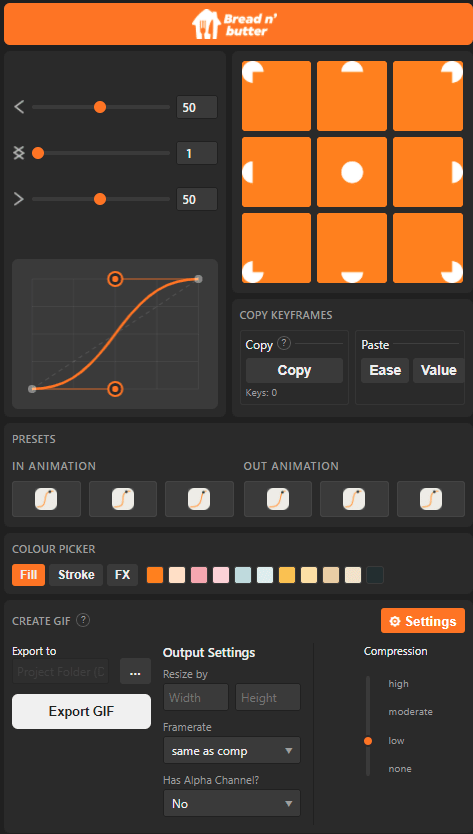
Motion guidelines are hard to apply consistently, especially for designers who don't live in the Graph Editor. Breadn Butter packages our entire motion language into a single, easy-to-use CEP plugin. Every designer on the team uses it to turn a storyboard into a polished animation without needing to be a specialist. Alongside these day-to-day tools, a built-in GIF exporter batch-exports and compresses directly inside After Effects, saving hours on large campaigns.
04 / 05
Studio Hub
The Problem
Design teams and stakeholders wasted hours searching for templates across fragmented drives, and asset delivery relied on manual engineering and bottlenecked request queues.
What I Built
A secure, enterprise-grade digital asset manager and AI-powered workflow hub deployed across the entire organization. Built as a desktop app and native After Effects panel, it connects AI agents to automatically surface creative assets directly from Jira tickets, supporting full self-service for stakeholders. This is the first app built by a non-engineer to be adopted company-wide, and it is now supported by a dedicated Product Owner.
How It Works
- Jira Ticket / User Query
- Studio Hub Desktop App / AE Panel
- AI Agent
- Automated Drive Asset Retrieval
- Stakeholder Self-Service
05 / 05
Studio Tools
The Problem
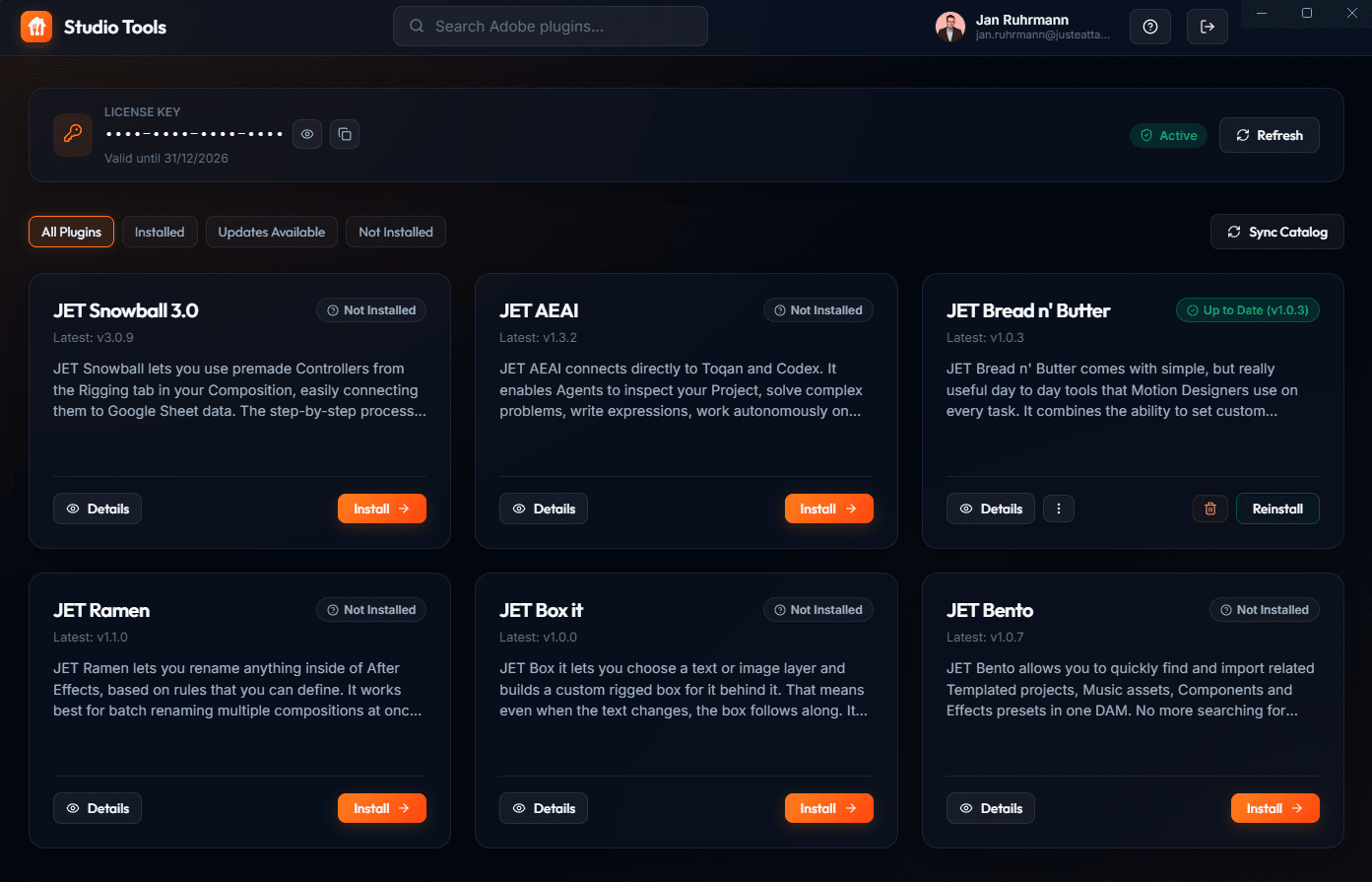
Installing custom After Effects and Premiere plugins required navigating obscure directory structures, dealing with OS-level permissions, and installing third-party ZXP installers. This created a significant technical barrier for artists, leading to version fragmentation and frequent support requests.
What I Built
A bespoke Electron desktop application that serves as a central hub and app store for all custom plugins (including Snowball, JET AE AI, and Breadn Butter). It handles licensing through Google OAuth and automates installation directly into Adobe directory structures. New updates are automatically pushed through, ensuring the entire team always runs the latest verified versions without manual installation.
How It Works
- Google OAuth User licensing
- Studio Tools Electron App
- Auto-Update Checks
- Local Node.js filesystem operations
- Automated Plugin Injection & Updates
Contact